

There’s a lot of hype around AI, and if you’re a small business owner it can be hard to know what’s genuinely useful and what’s just noise. The good news? AI has come a long way in a very short time, and there are plenty of practical, everyday tasks it can help with.
Here at DIY Digital we’ve been using AI tools for a while now and we keep finding new ways it can save time and take the headache out of those jobs that tend to pile up. Here are ten of our favourites.
Social Media Posts
Coming up with fresh social media content week after week is exhausting. AI can draft posts for you based on your website, your services and the tone you’re after. Give it your website address, tell it who your audience is and ask for a week’s worth of posts. You’ll still want to tweak them and add your own personality, but it beats staring at a blank screen on a Monday morning.
Client Proposals
Need to send a professional proposal to a potential client? AI can build one from scratch. Give it the client’s website, a brief description of the project and what you’d like to include — scope, timeline, pricing — and it’ll produce a polished, client-ready document. Upload the client’s logo and it’ll even come back in their colours and font.
Website Content
Whether it’s a product description, an About Us page, or a services overview, AI is surprisingly good at writing website copy. The trick is to give it context — tell it who you are, who your customers are, and what makes you different.
One of our favourite prompts starts with telling the AI to take on a specific role. “You are a World War 2 historian” completely changes the voice, the detail and the tone of the answer. Try it with your own industry — “You are a qualified nutritionist” or “You are an experienced landscape designer” — and see the difference it makes.
Client Quotes
If you’ve got a quote template you send to clients, AI can fill it in for you. Hand over your template and the job details and it’ll populate the business name, pricing, line items and date — ready to send. No more copying and pasting between documents.
Writing Reports
From monthly summaries to end-of-project wrap-ups, report writing is one of those tasks that always seems to take longer than it should. AI can take your notes, data or dot points and turn them into a well-structured, professional report. Tell it who the audience is — your client, your board, your team — and it adjusts the language and level of detail to match.
Spreadsheet Analysis
Got a spreadsheet full of transactions, inventory data, or survey responses that you keep meaning to look at? AI can read through it and give you a plain-English summary — how much you spent, where the money went, which products are selling, what’s trending up or down. You can even ask it to create a chart or a formatted document which you can send to your accountant or bookkeeper.
Finding and Summarising Email Conversations
We’ve all been there — you know you discussed something important with a client six months ago, but finding it buried in your inbox feels impossible. AI can search through your email, find the relevant conversations and summarise what was discussed. No more scrolling through hundreds of messages trying to piece it all together.
Sorting, Labelling and Archiving Your Emails
On the topic of email — AI can do more than just find things. It can go through your inbox, label enquiries sort (and start) by subject or send and archive the rest. You can even set it up to run every day so your inbox stays under control without you lifting a finger. If email management is the bane of your existence, this one’s a game changer.
Solving Your Technical Problems
Whether it’s a website throwing an error, an app that’s stopped working, or a setting you can’t find, AI is like having a tech support person on call. Describe the problem, paste in the error message and more often than not it’ll walk you through a fix, step by step. You can upload a screenshot with the error message. Be sure to be as detailed as you can. ‘It’s not working’ is likely to be unhelpful – try to be specific.
Image Generation
This one’s fun. Give AI a simple description — say, “a boy with glasses riding a bicycle” — and it’ll generate an image for you. What’s really impressive is how many styles you can choose from. The same description can come back as a cartoon, a watercolour, a manga drawing, a 3D Pixar-style render or even a Minecraft character. Have a look at this example with the same prompt but twelve completely different styles.
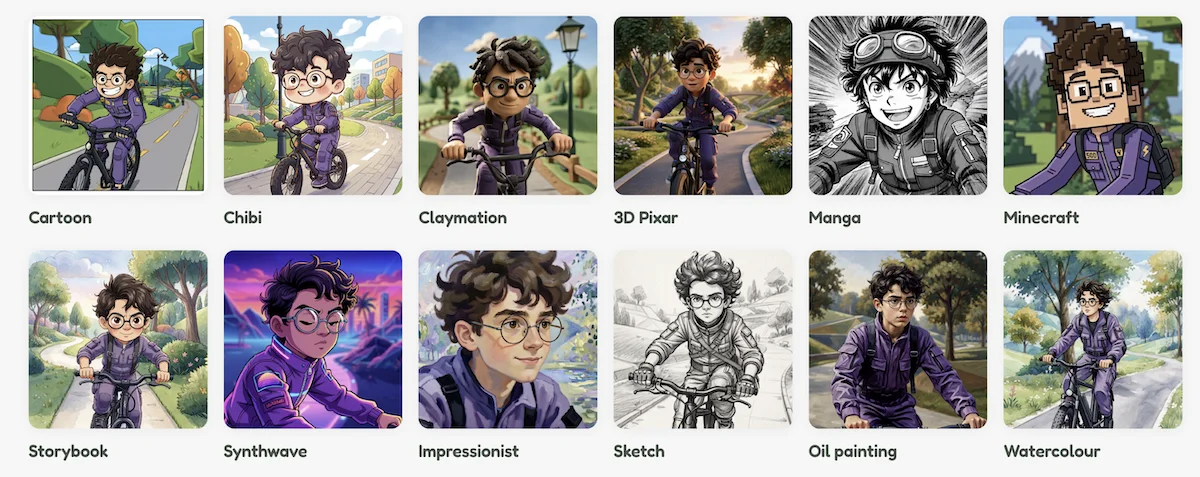
You’re not going to win any art awards, but for social media graphics, blog images and presentation slides, AI-generated images are quick and affordable. However, be sure to check, as sometimes the images can come out a little weird. It can also be good practice to credit the image as being generated by AI especially if it purports to be realistic, historical or technical, as if there are mistakes at least the viewer is aware that it is not real.
Where to Start
If you’re new to AI, our advice is to pick just one of these and have a go. You don’t need to be a tech wizard — if you can write an email, you can use AI. Start with something low-risk like drafting a social media post or summarising a spreadsheet and build your confidence from there.

Your New Beautiful Website
Affordable, custom built websites for small businesses, local shops, professionals, tradies and solopreneurs.